
Ahrefs and SEMRush are leading SEO tools that help you optimize your website for search engines. But where is it? SEO tools best meets your needs.
If only look back SEO Tools SEMrush and Ahrefs are evenly matched. Any tool is good! But if we analyze further, we see that they belong to two different schools.
SEMrush specializes in On-Page and Content, while Ahrefs specializes in Content and Backlinks.
Specifically, please join ToolsClick to analyze the detailed strengths and weaknesses of SEMrush and Ahrefs!
In this comparison review, ToolsClick will Compare Ahrefs and SEMrush thereby helping you find the top SEO tool that best meets your needs.
Features comparison between SEMRush and Ahref:
…and the advantages and disadvantages of each tool.
Ahrefs and SEMRush are two products that help you search engine optimization. Based on reports and information in the system you can:
Both tools give you keyword suggestions based on the phrases you enter, which can be used as a basis for writing blog posts that are likely to perform well in search results.
These tools also tell you how difficult it is to rank for specific phrases.
This SEO tool will help you identify websites that may be reaching out for a backlink.
And it’s essential that both of these SEO tools allow you to perform an SEO audit on your website to find out if there are any technical improvements you can make to help you achieve better search results. In addition, these are also tools SEO services Used to measure Website SEO parameters to help have a clearer view of the current status and performance of the website, thereby having an effective SEO strategy.
Additionally, there are many other features offered by Ahrefs and SEMrush that are designed to help you increase your search rankings.
Let’s start with something called domain analysis.
One of the most useful things you can do with Ahrefs and SEMrush is basic domain analysis, which is important for helping you get a simple overview of how a domain is performing from a V perspective.
Generally, you perform domain analysis on your own site to find issues that can improve SEO – or on your competitors, to see how difficult it is compared to search results (or to find ways to do so).

Performing domain analysis is simple in both tools, you simply enter the domain name in the input box and key metrics are returned to you quickly (in a dashboard format).
With both of these tools you can:
The quality of domain analysis in Ahrefs and SEMrush is similar; However, Ahrefs has the advantage of being very intuitive, and fast, giving you easy access to important statistics.
When you are in the ‘Site Explorer‘ by Ahrefs, you’ll have a really easy-to-use menu on the left side of the screen that allows you to drill down into areas you want to explore more deeply (competing domains, keywords, internal links, etc).
With SEMRush, domain analysis falls under a broader section called ‘Competitive research’ which includes 4 different sections, all of which contain data related to domain analysis.

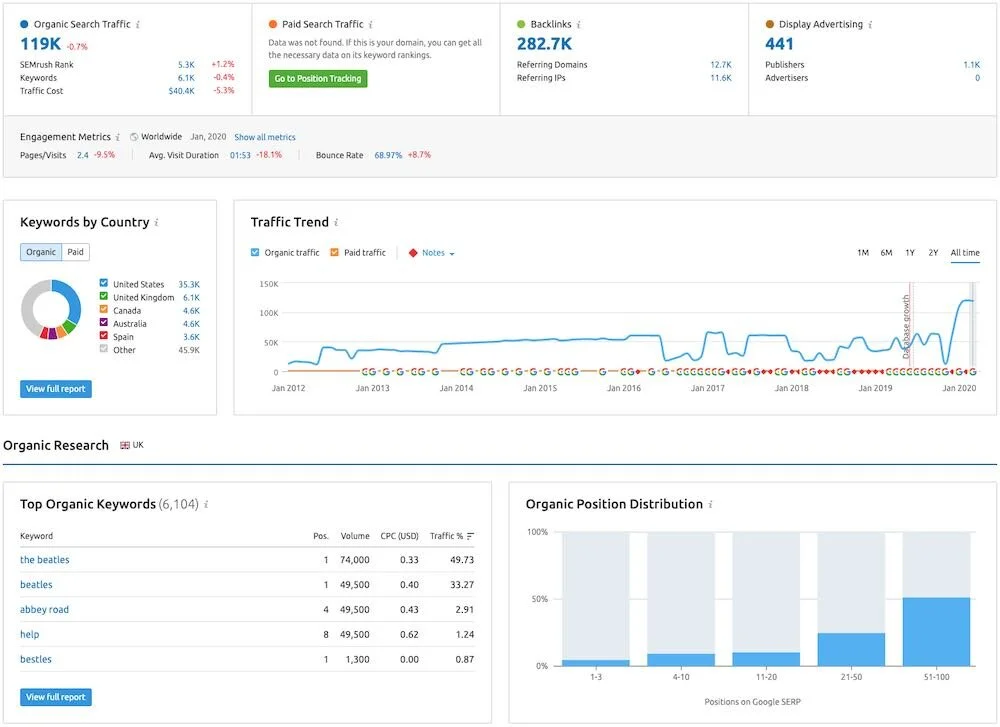
Both tools give you an estimate of monthly traffic to the domain you are analyzing – important to note however the figures provided here are estimates.
Based on my own (small-scale) personal testing – using sites where I have access to traffic data – I found that Ahrefs estimates tend to be more accurate; However, SEMrush contextualizes its results a bit by giving you an indication of how accurate its estimates are (high, average, or low).
The important thing to remember with either traffic metric is that they should be used to identify trends (i.e. site A is more popular than sites B and C) rather than taken as absolutes.
Finally, there’s a nice feature in SEMRush’s domain analysis that you won’t find a direct equivalent in Ahrefs:’competitive positioning map‘ (competitive positioning map). This gives a really good indicator of how a site is performing against its main competitors, based on the number of keywords it ranks for and monthly traffic estimates.
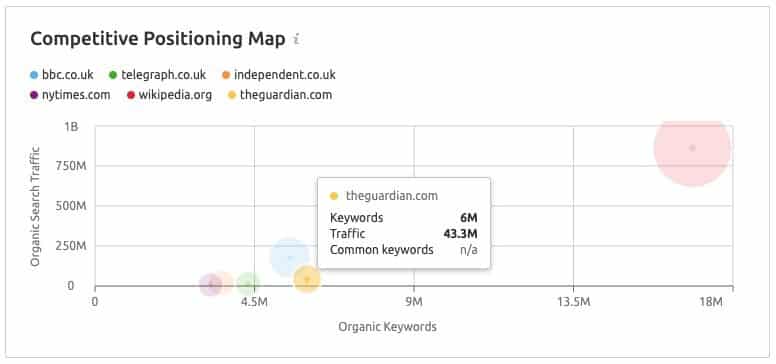
Overall, I would give Ahrefs a slight win in the domain analytics department, mainly because all the information you need is more concentrated in one place.
Now, let’s take a look at the keyword research features – a very important part of both Ahrefs and SEMrush.
Keyword research is generally about four things:
Both Ahrefs and SEMrush make it easy to find out all of the above information.
You simply enter the keyword into their respective keyword research tools (‘Keyword Explorer’ in Ahrefs and ‘Keyword Overview’ in SEMRush) and you will get the information you need instantly: search volume, keyword difficulty score, sites currently ranking for it, and a list of related keywords.
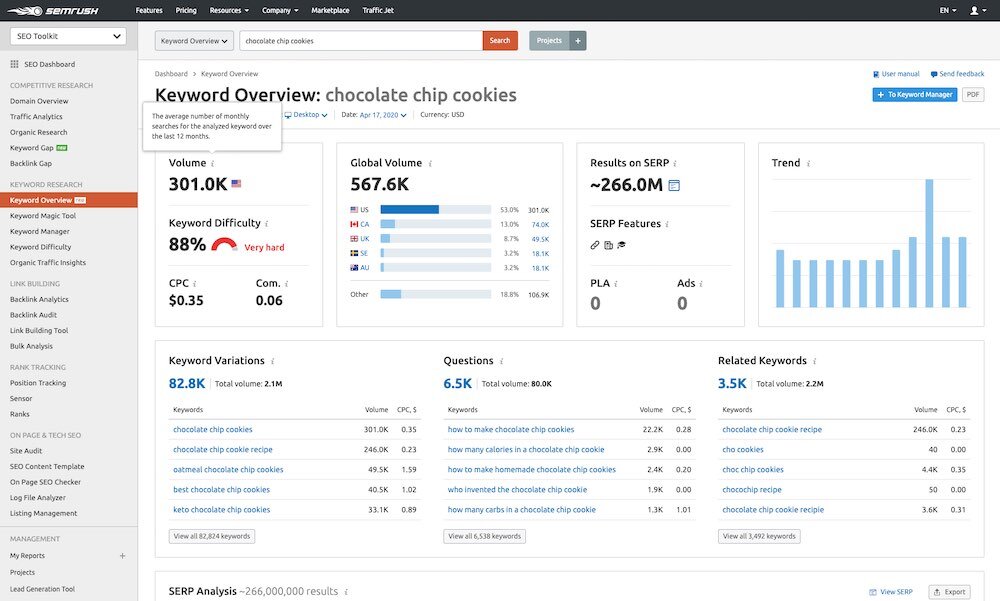
SEMRush uses percentage scores to indicate keyword difficulty – with higher percentages indicating higher difficulty. Ahrefs uses a score out of one hundred – as with SEMrush, higher scores indicate greater difficulty.
When you check SEMrush’s keyword suggestions section, you’ll notice that its difficulty is a bit different from Ahrefs’ in that it’s given as a decimal (with 2 digits after the decimal point), whereas with Ahrefs, it’s always given as an integer.
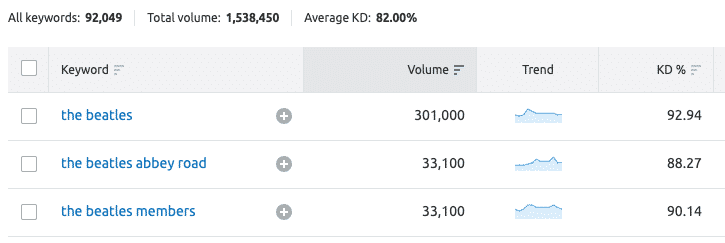
This means you can get more information about keyword difficulty from SEMrush.
Chief SEMrush and Ahrefs both allow you to create a list of keywords that you can refer to anytime you want using the corresponding features in keyword management.
So far, we are talking about a pretty similar feature that comes into play when it comes to keyword research. However, both products have some nice keyword-related features that the other products don’t have.
One thing I really like about Ahrefs’ approach to keyword difficulty scores is that it not only tells you how difficult it will be to rank for a particular keyword, but also tells you roughly how many backlinks (links from other websites to you) it would take to appear on the first page of search results.

Ahrefs is a famous company, currently with offices in the US and Singapore. Their strongest advantage is in Backlinks (The name itself says it).
Ahrefs has a huge Backlinks database, has multiple keyword databases for keyword analysis and research, Site Audit, Position Tracking, Content Explorer (can find the most shared content on some topics).
Regarding customer care, it is not my strong point Ahrefs: No special support, cannot be customized to user needs, no training courses or features to add users or add projects.
Basically, Ahrefs There are almost no sales departments or customer management staff.
Additionally, they offer Pro Rank Tracker (daily updates + mobile rankings) but you have to pay extra (500kw/50$).
Additionally, Ahrefs shows not only the number of searches but also the number of clicks they will likely generate (not all users click on organic results – some click on ads, etc.).
Another area where Ahrefs has an edge over SEMrush in the keyword research department involves the search engines where you can actually do the research.
While SEMrush only provides data for Google searches, Ahrefs allows doing keyword research for 9 other search engines, including great ones like Youtube, Yahoo, and Amazon.
Now, admittedly, the majority of searches are still done on Google – 92% at the time of writing – if you need to do keyword research for other search engines, then Ahrefs is a better choice.
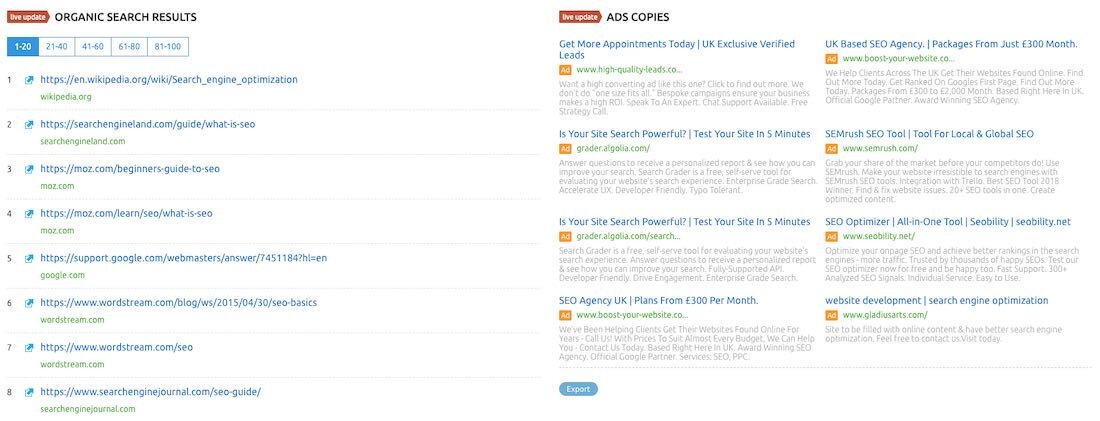
However, if you are looking for a research tool to cover both organic search and PPC, you may find SEMRush to be a better choice. This is because it returns detailed CPC competition and delivery data, along with live advertising. (You can also use it to create entire PPC campaigns.)
Ahrefs does show some information related to PPC, but it is limited to cost per click.
So overall, I can give Ahrefs wins here, because it provides more useful ‘at-a-glance’ information when searching organically, and also allows you to do keyword research for a significantly broader range of search engines than SEMrush.
However, if PPC data is important to you, SEMrush may be a more suitable tool as it highlights chief organic data and PPC data. For the SEO company, they often use many different tools to help measure and track parameters, website status as well as the effectiveness of SEO campaigns.
Now let’s move on to backlink analysis.
How well a website performs in search results depends greatly on the number of backlinks – external websites linking to it – that exist for the website in question.
With both Ahrefs and SEMRush, you can enter a domain name and see a list of all the backlinks to it that each tool can find.
Based on figures published by Ahrefs and SEMrush, SEMrush’s domain database is significantly larger than Ahrefs’, containing 717 million domains to Ahrefs’ 163 million (at the time of writing).
This means that in theory, your SEMrush will be able to provide more comprehensive domain and backlink analysis.

What’s interesting, however, is that in my own testing, how many backlinks each tool found seemed to vary quite a bit depending on the domain I was looking at.
For example, while doing some simple domain analysis, I noticed that Ahrefs found more backlinks for Shopify.com than SEMrush did; but conversely, SEMrush found more for Bigcommerce.com than Ahrefs did.
As I analyzed more domains, this pattern continued – sometimes Ahrefs provided a more comprehensive set of results, sometimes SEMRush did.
But at least on paper, it looks like SEMrush has a larger database.
In terms of backlink analysis, both Ahrefs and SEMrush give you a lot of useful information about the backlinks pointing to a domain, including breakdowns of:
I generally like the way SEMrush presents this information – a series of simple but attractive charts that spell out key metrics in a way that helps you digest them easily.
Additionally, both Ahrefs and SEMrush give you ‘link intersection’ tools. This allows you to compare a URL from your site with corresponding URLs from your competitors’ sites and gives you a list of sites that are currently linking to your competitors, but not to you.
SEMrush’s link intersection tool is slightly better than Ahref’s, because it allows you to compare your site’s backlinks with 4 other sites, while Ahrefs limits the comparison to 3 other sites. However, I see Ahrefs a little easier to use.

However, one useful feature of Ahrefs that is not available in SEMrush is ‘anchor context’ – in Ahrefs, the backlinks report shows you not just the anchor text used to link to your site but the text surrounding it. This will help you understand why people are linking to a specific piece of content.
SEMrush offers a few backlink-related features that have no direct equivalent in Ahrefs – and very useful features at that.
See more articles: What are backlinks? How to create Backlinks effectively and safely
First, there is a ‘backlink checker’ tool that identifies potentially ‘toxic’ links (spammy links that can lead to you being penalized in search results). You can export this list of links, then you can upload to Google as a ‘disavow’ file (this tells Google to ignore them).

Second, there is a ‘backlink builder’ tool that analyzes your domain or URL and gives you a list of websites to target with a request for a new backlink.
What’s cool about this feature is that you’re not just dealing with a spreadsheet of URLs – you’re dealing with a more ‘CRM’ style interface, with each domain listed as a ‘lead’.

You can click the button next to each lead to move it into different stages of the link building pipeline and send outreach emails directly within the SEMRush interface (by connecting mailboxes – Gmail, Yahoo, etc.).
This is a lovely feature and there is nothing comparable in Ahrefs.
Overall, it’s fair to say that both Ahrefs and SEMrush give you great backlink analysis functionality – for me, SEMrush is a bit ahead here, because of its awesome backlink builder and malicious backlink builder tools.
Both Ahrefs and SEMrush offer ‘site audit’ features that allow you to evaluate how well your website is performing from a technical SEO and website SEO perspective.
During a site audit, both tools will look for issues that could have a negative impact on your search rankings, including:

Both tools give you a ton of really useful suggestions, but I think SEMrush comes out on top in the auditing department.
Its website audit tool is significantly easier to use than the Ahrefs equivalent and automatically gives you easy-to-do to-do lists.

(In contrast, Ahrefs encourages you to create your own ‘to-do’ list by looking through your site audit reports and using the ‘plus’ button to add a task to it.)
I especially like SEMRush’s on-page SEO checker, which goes through your entire website and gives you actionable tips for improvement for each page (in order of priority). These may include suggestions about
…and much more.

It’s easy to use and a really great tool to have in your SEO arsenal.
Because of this feature, I’ll give SEMrush the win in the audit department.
Broken link building is an important SEO tactic.
It involves finding a broken link (i.e. a link that no longer leads anywhere), recreating the ‘dead’ content it used to point to, and then asking anyone using the link to the dead content to link to your content.
This approach allows you to build new backlinks to your content – and the more backlinks pointing to your site, the better your content will perform in search.
To make SEO tactics To work effectively, you need to be able to identify broken links, and both Ahrefs and SEMrush offer features to do so.
Ahrefs makes it super Easy to find broken links. You just need to enter a domain name in its ‘Site Explorer’ section and click on ‘broken link’. This then gives you a list of all of that domain’s broken links (and the sites that have these links).
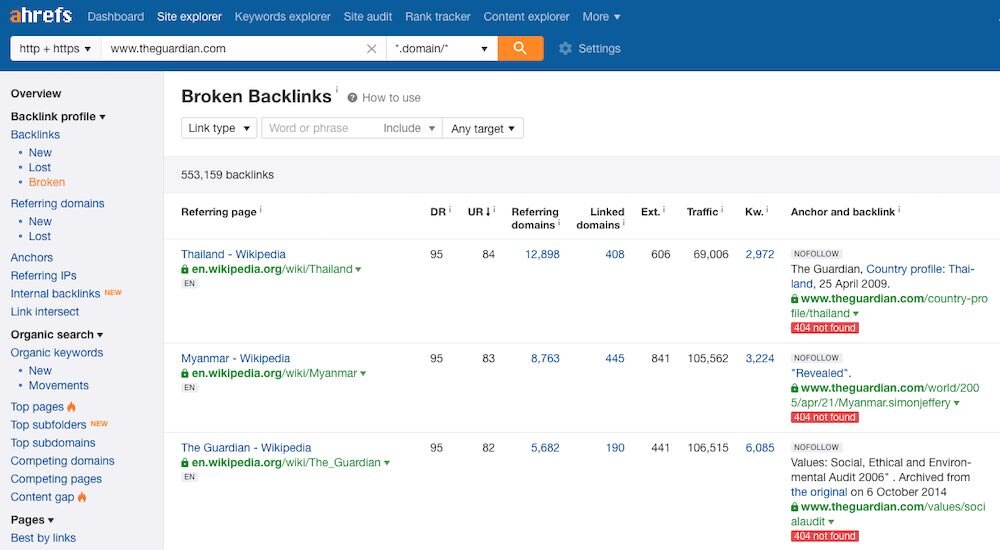
SEMrush’s broken link building feature is less straightforward – you need to do a full ‘site audit’ on your competitor’s site, then click a checkbox to identify URL errors – but it’s a bit more complicated, because you can move any broken links to an outreach list that you can use to contact the domain owner.
Again, this can be done directly in SEMrush, using connected mailboxes and the CRM ‘pipeline’ method mentioned earlier.
It is important to ensure that your web pages do not contain broken incoming links the website other , as these pages can be interpreted as a sign of poor quality content by Google and other search engines (with negative implications for rankings).
Both Ahrefs and SEMrush provide you with a means to detect broken external links; But as with broken inbound links, things are simpler with Ahrefs.
With Ahrefs, you simply enter the domain name into its ‘Site Explorer’, go to the ‘outgoing links’ section and hit the ‘broken links’ option to see the results. However, with SEMrush, you have to do a full site audit to see broken external links.
My feeling is that in general, Ahrefs – in general – tools are easier to use.
Its interface is cleaner than SEMrush; Its menu is presented in a more streamlined way; and its dashboard seems to group pieces of information together in a more relevant, coherent way.
With Ahrefs, you get a quick understanding of SEO information – whereas with SEMrush, you often have to dig more or click on location to get the data you need.
That’s not to say that SEMrush is particularly difficult to use and to be fair to the product, perhaps part of the reason for the increased complexity in SEMrush is that it often gives you more information than Ahrefs – in terms of graphs, data PPC and pipelines.
And if you enjoy data visualization, the SEMrush method will certainly appeal.
However, there is one area where SEMrush definitely wins in the ease-of-use stakes: its website audit feature. It’s simple to use and offers a really easy-to-follow set of instructions to improve your performance in search results.
And, if the idea of doing link building or broken link building without exporting multiple Excel spreadsheets appeals to you, then SEMrush is definitely a good choice. Its CRM-style approach means you can work ‘in the box’, keeping all your data in the product and emailing site owners directly from there.
Finally, if you want to drill down and get digestible data quickly, Ahrefs is a better choice. For work and project-based approaches, SEMrush Definitely the better choice.
Compared to other types of ‘SaaS’ (software as a service) applications, Ahrefs and SEMrush are expensive.
That’s understandable, though, since you’re not just paying for functionality, you’re paying for access to a ton of data, including information about your competitors.
SEMRush offers 3 pricing plans:
Ahrefs does 4 types :
If you pay for a year in advance, Ahrefs gives you two months free.
In terms of better value, this will depend largely on your business requirements (and budget).
That said, there are a few important things to zoom in on when trying to come up with what’s most beneficial for your particular organization.
By default, all SEMrush plans come with only one user account. You pay an additional monthly fee to add additional users to the plan ($70 per month per ‘Pro’ user or $100 per month per ‘Pro’ or ‘Business’ user).
And, annoyingly, there’s a limit to the number of seats per plan – only the ‘Business’ plan lets you add more than 2 users (the total number of users on this plan is 9).
Ahrefs is a bit more generous in this regard, with ‘Advanced’ and ‘Agency’ plans allowing you to use 3 or 5 user accounts respectively.
Both Ahrefs and SEMrush limit the number of projects you can create.
Ahrefs is more generous here at the entry-level end, with a $99 plan that lets you create 5 projects; SEMrush caps this at 3.
When you go up the pricing scale and compare SEMRush’s ‘Professional’ plan with Ahrefs’ ‘Standard’ plan, SEMrush’s offering becomes the more generous of the two – you can create 15 projects to Ahrefs’ 10.
The $399 Ahrefs and SEMrush plans both let you create 25 projects.
One thing I noticed while testing these two tools is that some important functions in SEMrush are only available if you are working on a project: backlink checking and broken link analysis.
So for users who need to perform these tasks across a bunch of different sites, this can be a headache – while project limits don’t make this possible, it does make things more difficult than you’d like, and you really have to keep a free project slot for any ‘ad hoc’ work.
There are quite a few SEMrush features for analyzing competitor websites that are not available without purchasing the ‘competitive intelligence’ add-on.
That is:
Disappointingly, this add-on costs $200 per month. To be fair, most of the above figures could be considered worth paying a little extra, but $200 per month feels very steep.
SEMrush is more generous very much when it comes to the number of reporting requests you can make per day: even on the entry-level plan, you can pull up 3,000 domain analysis reports per day – this number dwarfs Ahrefs’ 25.
This comparative generosity continues as you go up the pricing scale: SEMrush’s daily limit for its $399 plan reports 10,000; The limit of the $399 Ahrefs plan is only 250.
If you’re working on a mixture of SEO and PPC projects, you may find that SEMrush represents better value. This is simply because it has more PPC data – while Ahrefs gives you CPC metrics for individual keywords, SEMrush goes beyond this, giving you detailed CPC competition and delivery data, live advertising, and PPC campaign planning tools.
When it comes to support for Ahrefs and SEMrush, I admittedly don’t have much experience with the company’s support teams. This is probably a good thing, since I don’t really need much support for either tool!
However, you could argue that SEMrush has a slight advantage in the support department, because it offers 3 support channels: phone, chat, and email.
In contrast, Ahrefs does not offer any phone support. But its support options are much clearer: when working in Ahrefs, you simply click the question mark icon – always visible in the lower right corner of the screen – to chat with a support team member. I’ve used this a few times and was pleased with the response time – it was more or less instant.
With SEMrush, you have to scroll down to the footer for contact details. However, on the plus side, relevant numbers and email addresses are displayed in a very prominent way – there’s no need to search the knowledge base before gaining access to them (which is often the case with SaaS products).
Both Ahrefs and Semrush let you try the product before committing to their monthly plans.
With Ahrefs, however, you have to pay to do so – $7 will get you access to a 7-day trial of its ‘Lite’ or ‘Standard’ plans.
On the contrary, SEMrush allows you to try the product completely for free. Normally speaking, this trial lasts 7 days, for a limited time they have made a 14 day free trial, available using this link . The length of this test is quite generous given the amount of data you could theoretically access during the process. However, please note that you need to enter credit card details before starting the trial – which is a bit annoying.
So, which is better, Ahrefs or SEMrush?
Well, I would be happy to use one of these tools for an SEO related project. I don’t really think you can say that one is ‘better’ than the other, but I feel that, depending on the context in question, one of them may prove more ‘suitable’ for your business than the other.
So, all things considered, here are the reasons why you might want to use one of these products over the others.


Hopefully some comparisons about SEMrush and Ahrefs from ToolsClick above have answered your questions about the advantages and disadvantages of these two SEO tools.
You can rely on the above advantages and disadvantages to determine which tool is really good for your website, or if you have any additional comments on the advantages and disadvantages of SEMrush and Ahrefs, please comment below to discuss with us.



Group buying website for tools
World's leading

Youtube ToolsClick
A guide from A to Z

Fanpage
Top quality

Group ToolsClick
Technical Support & Gifts

ToolsClick Software
Proprietary software