










Are you having difficulty keeping track of hundreds of contracts at the same time? Do you often miss payment deadlines or confuse debt data on separate Excel files? Contract – debt management template on Google Sheets at ToolsClick is the “lifesaver” for you. No need to install complex contract management software, you can still manage all data centrally and professionally at an extremely low cost.
In 2026, speed and collaboration are the keys to success. If you are still using it Excel file for contract management saved locally on your computer, you are facing many risks:
Inconsistent data: Many different file versions cause confusion.
Difficulties in collaborating: Multiple people cannot update data at the same time.
Lack of warning: No automatic reminders when payment is due.
Online contract management template at ToolsClick completely overcomes these weaknesses thanks to the powerful Google Sheets platform, allowing you to access anytime, anywhere on any device.
This Template Set is designed for simplicity contract making process complexity into easy data entry operations but produces extremely in-depth reports.
You have full rights to customize items to suit your business characteristics:
Person in charge (Sales/Admin).
Contract status (Ongoing, Completed, Cancelled).
Type of contract and services provided.
Diverse payment methods.
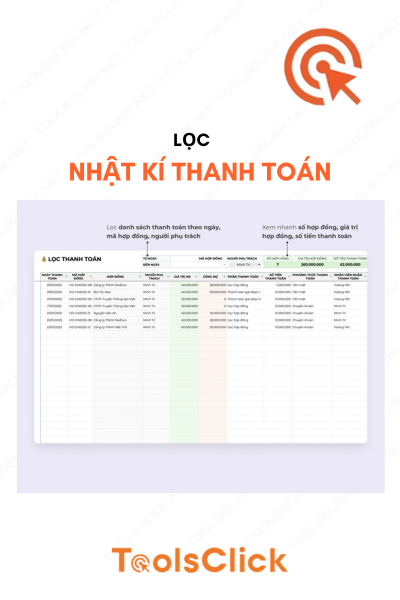
All core information is managed by contract code, customer name, value and payment status. This helps you look up information in just a few seconds instead of having to flip through pages of paper documents or search through dozens of folders.
This is the most important part to help you control your cash flow:
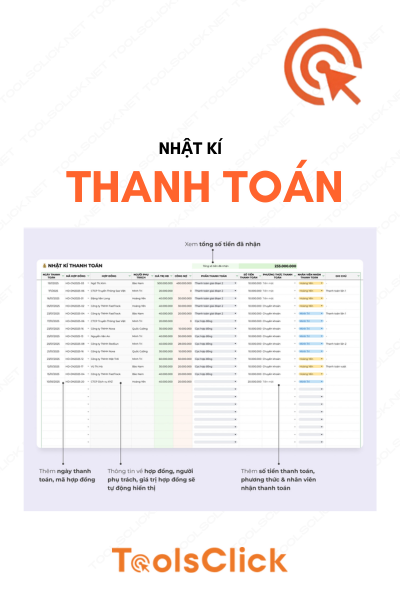
Manage detailed list of payment batches.
Automatic features: Information about debt and payment status of each contract will automatically update as soon as you enter data into the diary.
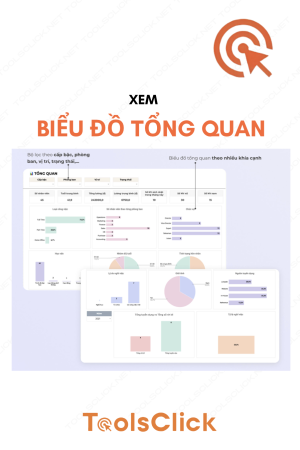
No need to be a financial expert, you can still grasp the “health” of your business through the charts:
View contract value & actual receipt by month.
Quick list of unpaid or only partially paid contracts.
Monitor sales by each person in charge to evaluate work efficiency.
The system helps you be proactive in debt collection:
View the list of contracts due by month.
Quickly classify the number of contracts that are due within Next 7 days, Next 3 days for priority processing.
| Features | Traditional Excel File | Management Software (SaaS) | Google Sheets Template (ToolsClick) |
| Remote access | No (Only devices with files) | Have | Yes (All devices) |
| Automate debt | Complicated manual operation | Have | 100% automatic update |
| Dashboard chart | Must draw yourself | Available | Available intuitively |
| Price | Free (but laborious) | Monthly Fee (High) | Buy once – Extremely cheap price |
| Easy to customize | Difficult | Almost impossible | Extremely flexible |
To start professionalizing the process, you just need to take 4 simple steps:
Step 1: Set up categories: Update personnel name, service type and payment method on the Settings page.
Step 2: Enter contract information: Fill in basic information when signing a new contract.
Step 3: Update payment log: Every time a customer transfers money, enter it in the Journal. The system will automatically deduct the debt on the Summary page.
Step 4: Monitor Dashboard: At the end of each week/month, visit the Overview page to view sales reports and process upcoming contracts.
Usage contract management template It will be more effective when you combine it with other copyright toolkits in our system:
Record storage: Use Google One to have 10TB of data to store scanned PDF contracts.
Design beautiful contract templates: Use Canva account to create professional contract templates and quotes to send to customers.
Content plan: Combined with Content Plan Template to manage work schedules in parallel with financial management.
Q: Do I need to know Google Sheets functions to use it?
Reply: No need. All formulas have been pre-set and locked by us to avoid errors. You just need to enter data in the specified cells.
Q: Is my data secure?
Reply: Completely confidential. This is your personal file on Google Drive. Only people you give access to can view or edit files.
Question: If I want to add some other columns of information, is it possible?
Reply: Okay. Google Sheets structure is extremely flexible, you can insert additional columns yourself or contact ToolsClick’s support team for customization instructions.
Question: Does this file limit the number of contracts?
Reply: Unlimited. Google Sheets supports millions of data cells, you can manage thousands of contracts for many years without worrying about data being full.
🚀 Buy now and receive discounts: Immediately receive Google Sheets file link and detailed usage instructions after just 1 minute of payment.
Dedicated support: If you need further customization for your business, don’t hesitate to chat with our technical team right away.
 Contract & Debt Management Template

Sorry, no reviews match your current selections


Group buying website for tools
World's leading

Youtube ToolsClick
A guide from A to Z

Fanpage
Top quality

Group ToolsClick
Technical Support & Gifts

ToolsClick Software
Proprietary software












Reviews
There are no reviews yet