



Don’t let excess peaks stifle the loudness of your professional mix. Own it now SIR Audio Tools StandardCLIP – the tool is dubbed Best Audio Clipper software Currently. With the ability to sharpen the peak accurately and increase the volume of the mix to the maximum without causing distortion, StandardCLIP is a must for every Mastering Engineer.
In the music production era of 2026, the Loudness war has never cooled down. Instead of using Music limiter brutally “flatten” the sound, experts choose SIR Audio Tools StandardCLIP for delicate Transient control. This is the perfect solution for you to achieve your desired volume level while still maintaining “Punchy” for the drum set and sharpness for the Vocals. At ToolsClick, we give you the opportunity Buy cheap SIR Audio Tools StandardCLIP and genuine.
The investment in one StandardCLIP mastering plugin Quality is a wise step to elevate music products. ToolsClick is proud to be a solution provider Buy copyright SIR Audio Tools StandardCLIP at optimal costs, helping producers and sound engineers in Vietnam access world-class tools easily.
We understand that investing in individual licensed plugins can put a dent in your budget. At ToolsClick, we provide solutions buy SIR Audio Tools StandardCLIP with level SIR Audio Tools StandardCLIP price Most optimal, 100% genuine commitment and direct activation to your account.
| Characteristic | Price from manufacturer (SIR) | Preferential prices at ToolsClick |
| StandardCLIP License | ~$25 – $30 | ~$8 |
| Activation form | Official License Key | Activation via personal account |
| Delivery time | Waiting for processing | Instant Delivery |
The search and Download StandardCLIP from unofficial sources poses many serious risks. Versions SIR Audio Tools StandardCLIP free floating around the internet often comes with viruses and malicious code that can steal data or damage your entire project. Furthermore, crack versions are often corrupted, unstable and cause serious Aliasing errors, destroying sound quality. Own Genuine StandardCLIP license key at ToolsClick not only protects your computer and your projects, but also gives you access to the cleanest audio processing technology available today.
What is SIR Audio Tools StandardCLIP? This is a dedicated VST/AU/AAX plugin for this Peak clipping, designed to increase the perceived loudness of a mix or individual tracks without negatively affecting the dynamic range like traditional Compressors or Limiters.
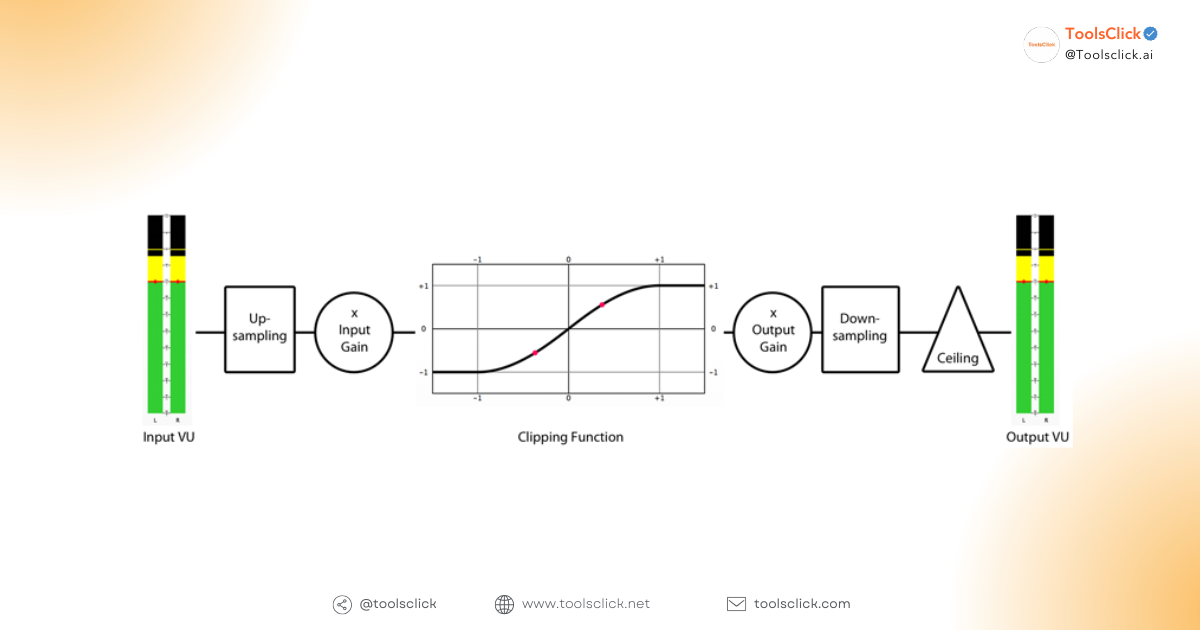
StandardCLIP works by “clipping” or “rounding” sound wave peaks that pass a certain threshold, helping to reduce True Peak and create headroom to push the overall volume higher. This is an indispensable tool mixing. mixing and mastering modern.
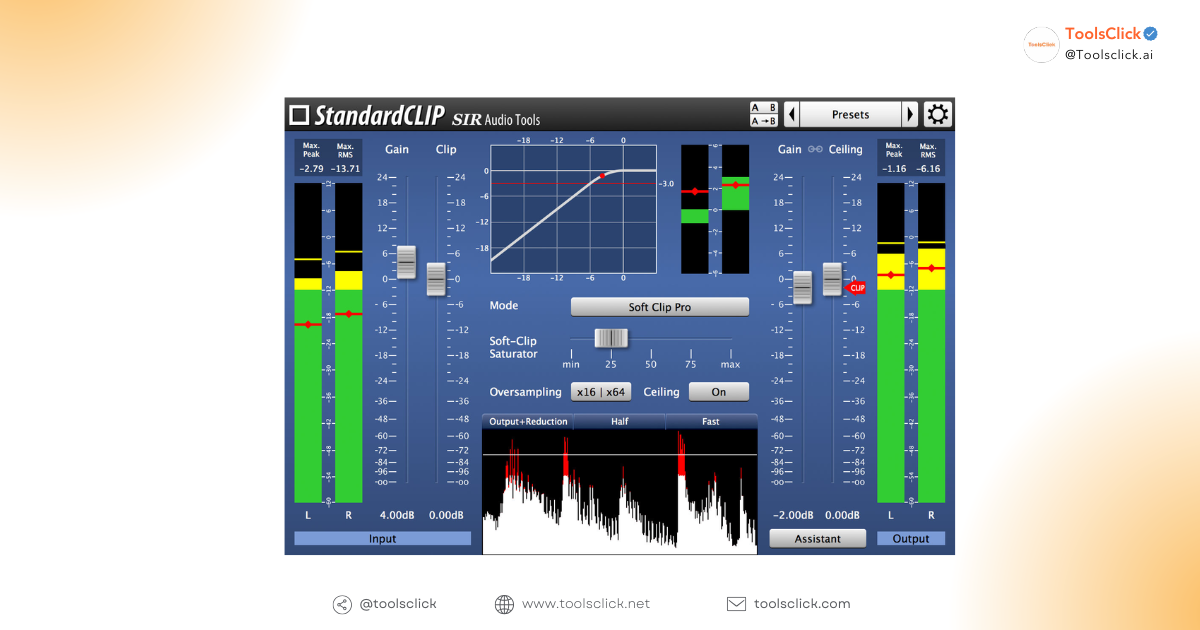
One of the “destructive” features of StandardCLIP is Oversampling up to 256x. This is a record number in the VST village Audio Clipper. Using high levels of Oversampling completely eliminates Aliasing (aliasing noise) when you perform Peak clipping at strong intensity. Thanks to that, your mix will always be clean and clear even at maximum Loudness level, ensuring no distortion.
You have full rights control audio peaks in the mix with two flexible processing modes.
StandardCLIP allows you to choose between modes Linear-phase filter mode and Minimum-phase filter mode. Linear-phase mode ensures phase coherence when resampling, a vital factor in resampling. mastering professional, helps avoid phase shift problems that can thin or weaken the sound.
This plugin offers a smart user interface. You can accurately monitor the difference between Input and Output through the system RMS meters input output exactly. Interface Waveform display Real-time display helps you “see” what wave peaks are being detected trim the top of the sound, from there make the decision to mix and peak control most accurate. Quantity Gain reduction is also clearly displayed.
Own StandardCLIP license key Our system comes with golden perks, ensuring a professional and uninterrupted music production experience.
When buy SIR Audio Tools StandardCLIP At ToolsClick, you will get the key to Activate the main StandardCLIP through personal account (Activation via personal account). This means that the copyright is directly linked to your information, you own it forever and completely.
StandardCLIP Windows macOS support is a big plus. The plugin is perfectly compatible with all operating systems from Windows 10/11 to the latest macOS lines, including Native support for Apple Silicon M1-M4 chips, ensuring optimal and stable performance.
StandardCLIP provides a full range of formats VST, AU, AAX plugins, making it work smoothly on all popular DAWs (recording software) such as Ableton Live, FL Studio, Logic Pro, Cubase, Pro Tools… This ensures a seamless workflow during the process. music production.
With experience supporting many customers, we at ToolsClick understand that installation and activation can sometimes be difficult. Therefore, our technical team is always ready to support you 24/7 via UltraView to ensure you can use audio software in the fastest and most effective way.
Professional Producers often use it Mastering Clipper VST This is for the specific purpose of creating powerful and clean mixes.
StandardCLIP is one clipper plugin for drums and bass extremely effective. When applied on the Drum Bus, it helps smooth out the transient peaks of the Snare and Kick. This not only helps with control dynamic range but also “makes room” for other instruments in the mix without losing the powerful punch of the drum set.
A common technique in mastering is to place the StandardCLIP right before the last Limiter on the Master Chain. By trimming excess peaks by about 1-2dB, StandardCLIP helps Limiters (eg FabFilter Pro-L nice Waves L3-LL) work “lighter”. As a result, you can achieve higher levels of Loudness without distortion and retain more detail in the mix. Here’s how increase uncompressed volume effective.
Don’t just think of StandardCLIP as a tool peak control. Take advantage of the Soft clipping mode to add odd harmonics (Harmonics), helps the mix become richer, warmer and more “attitude”, replicating the colors of expensive analog equipment.
Procedure Activate the main StandardCLIP at ToolsClick is designed to be as simple and fast as possible. Here it is StandardCLIP user manual basic to get started.
Immediately after successful payment at ToolsClick, you will receive a code Genuine StandardCLIP license key via email or in your customer account.
Visit the official SIR Audio Tools website, log in to your account (or create a new account) and register the code license key you have received.
After successful activation, you can Download StandardCLIP Latest installer from my SIR Audio Tools account. Install the plugin, open your DAW, log in and start using your new “weapon” to take your mix to the next level.
Below are some questions we often receive SIR Audio Tools StandardCLIP.
The appropriate level of Oversampling depends on your CPU power. Normally, when mixing, 16x to 32x is extremely clean and effective. However, when rendering the final file, we recommend pushing it to the highest level (256x) to ensure sound quality absolute.
Sure! The latest version in 2026 supports Native Apple Silicon, helping the plugin run extremely smoothly and stably on the latest Macbook lines M1, M2, M3 and even M4.
Yes, StandardCLIP is very effective in controlling instruments with high dynamics such as Acoustic Guitars or Vocals before feeding them to the Compressor. It helps “tame” sudden peaks, helping the Compressor operate smoother and more naturally.
StandardCLIP compare limiter is an interesting topic. Clipper (StandardCLIP) simply “cuts” the peak of the wave above the threshold, while Limiter is an extreme form of Compressor with infinite Ratio, it “compresses” the peak of the wave down. Clippers are often more transparent and have less impact on the overall sound as they only handle very short peaks. You should use Clipper before Limiter to reduce the load on Limiter, or use it alone on individual tracks (like drums) to retain Transient.
Based on many StandardCLIP assessment, the professional sound engineer and producer community all recognize this as one of the Best Audio Clipper software. They appreciate transparency, massive Oversampling capabilities, and flexibility between Hard and Soft clipping. Other plugins like StandardEQ, SIR3, and StandardGATE from the same developer also received praise.
In the competitive world of audio, the difference between a “gentle” mix and a powerful hit sometimes lies in a quality Clipper tool. Job Buy SIR Audio Tools StandardCLIP Copyright is the smartest choice for you to completely control the sound peaks and loudness of the music, guaranteed Distortion-free sound quality.
ACT NOW: Own the “Peaking Witch” StandardCLIP and start your professional Producer journey together ToolsClick today to receive preferential prices and best support
 SIR Audio Tools StandardCLIP

Sorry, no reviews match your current selections


Group buying website for tools
World's leading

Youtube ToolsClick
A guide from A to Z

Fanpage
Top quality

Group ToolsClick
Technical Support & Gifts

ToolsClick Software
Proprietary software
















Reviews
There are no reviews yet