





Is your mix muddy or lacking clarity due to conflicting frequencies? Wavesfactory Trackspacer is the solution. This 32-band dynamic sidechain EQ plugin automatically “makes room” for important instruments, keeping kick and bass separate and vocals always standing out. This article will explain why Trackspacer is an indispensable tool and how Buy Wavesfactory Trackspacer Permanent copyright with best price 2026.
In modern music production, space is the most valuable element. A professional mix is where each instrument has its own place, is clear and sharp. Trackspacer was created to perform that task more automatically and with more sophistication than any traditional compressor. This article will help you understand why every Producer and sound engineer chooses it Buy Wavesfactory Trackspacer and how it completely changes your mixing mindset.
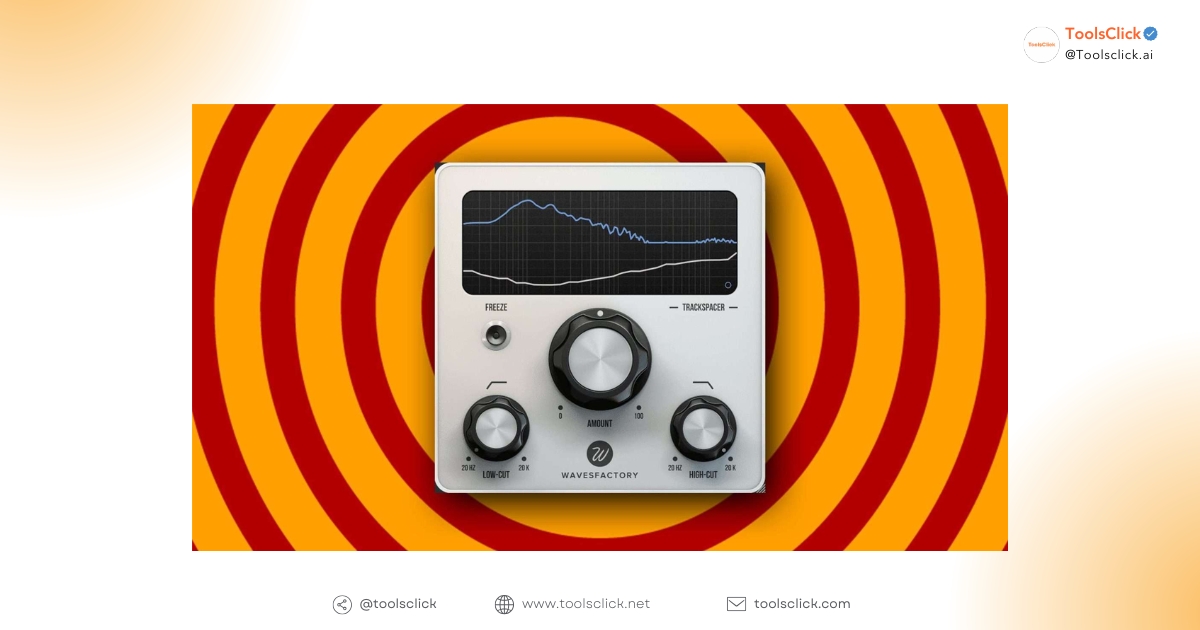
Wavesfactory Trackspacer is an intelligent audio processing plugin that acts as a 32-band dynamic EQ, automatically creating space for one track in the mix by reducing conflicting frequencies from another track. Simply put, it “listens” to one sound source (e.g., vocals) and automatically “trims” those exact frequencies on another sound source (e.g., guitar) to avoid them overlapping.
“Frequency Ducking” is a technique of automatically reducing a specific frequency range of an audio signal when another signal is present. Imagine your mix is a painting, and the two instruments are two colors trying to occupy the same position. The result is a “muddy” patch of color. Trackspacer, one frequency ducking plugin advanced, will not fade an entire color, but will only subtly reduce the intensity of overlapping color spots, helping both to coexist harmoniously. This is the core difference from traditional sidechain compression techniques, which reduce the overall volume.
Beneath Trackspacer’s simple interface lies an incredibly complex 32-band dynamic EQ. Instead of having a single compressor applied to the entire frequency range, Trackspacer analyzes the sidechain signal into 32 separate bands and applies an inverse EQ curve to the target track.
This means:
Trackspacer 2.5 brings many valuable improvements, from user interface to performance, making it an indispensable tool in any producer or audio engineer’s arsenal.
The genius of Trackspacer lies in its simplicity. Almost all of the plugin’s power is controlled by a single “Amount” knob. You just need to set up the sidechain, then gradually increase the Amount button until you achieve the desired separation. Visualizer Clearly displays the frequency spectrum being processed, making it easy to monitor and make decisions. This helps speed up work significantly.
One of the most powerful features is Mid/Side processing. Regime M/S Processing Allows you to choose to only affect the signal in the middle (Mid) or both sides (Side).
To fine-tune the effect more precisely, Trackspacer provides Low-Cut and High-Cut filters for the sidechain signal. You can limit the frequency range that the plugin will analyze. For example, when processing kick and bass, you can cut out the high frequencies on the sidechain signal from the kick, so that Trackspacer focuses only on creating space in the low range, preserving the sparkle and “attack” in the high range of the bass.
One of the top user requests that Wavesfactory met in version 2.5 was CPU optimization. Despite performing complex calculations across 32 bands in real time, Trackspacer remains the same low CPU usage plugin. This allows you to use multiple copies of the plugin in a large project without worrying about your computer being overloaded or lagging.
To better understand why you should Buy Wavesfactory Trackspacer, see a visual comparison between it and the traditional sidechain compression method.
| Criteria | Sidechain Compression | Wavesfactory Trackspacer |
| Mechanism of action | Reduces the entire volume of the target track. | Reduce only specific frequencies that cause conflicts. |
| Naturalness | Easy to cause “pumping” effect, “jumping” sound. | The sound is extremely smooth, transparent and difficult to detect. |
| Band number | 1 (Full range) | 32 dynamic bands (Dynamic EQ) |
| Difficulty setting | Need to tweak many parameters: Threshold, Ratio, Attack, Release. | Mainly uses one “Amount” button and intuitive interface. |
| Result | Can cause loss of detail and “body” of the instrument. | Effectively filters mud, creating a clear space while still retaining the essence of the sound. |
Sidechain compression works by using a signal to activate a compressor, reducing the overall volume of another track. Meanwhile, Trackspacer vs Sidechain Compression shows a clear difference: it does not touch the volume, but only “punches” the necessary frequency holes, exactly like a key fits into a lock.
The “pumping” effect of sidechain compression can be a creative choice in EDM music, but in most other mixing situations, it is an unwanted side effect. Trackspacer solves this problem by microsurgically intervening in the frequency spectrum, creating an extremely transparent and natural result. Even when applied vigorously, the effect is still difficult to notice.
This is the area where Trackspacer shines the most. Attempting to use static EQ to cut kick and bass frequencies often causes both instruments to lose power. With the Trackspacer, you can preserve the punch of the kick and the fullness of the bass. The plugin will automatically reduce the frequency of the bass just the moment the kick sounds, helping the two blend in but still stay perfectly separated.
In ToolsClick, we understand that producers and sound engineers are always looking for high-quality tools at a reasonable cost. That’s why we provide solutions Buy copyright Wavesfactory Trackspacer most optimal. ToolsClick is a provider of premium software packages for SEO, Content, Ecommerce,… at the best prices in Vietnam.
When Buy Wavesfactory Trackspacer Through ToolsClick, you will receive a permanent copyright. No monthly subscription fees, no hidden costs. You only need to invest once to own this powerful tool forever, one choice Buy Trackspacer economically and smart for a long-term career.
We are committed to providing Wavesfactory Trackspacer license key Genuine from the publisher. You will download the installer directly from the Wavesfactory homepage and use the key we provide to install it Activate Trackspacer 2.5. This ensures your plugin is always stable, up to date, and completely risk-free from cracked software.
Thanks to our partnership programs and joint purchasing policy, ToolsClick is proud to deliver Wavesfactory Trackspacer price most competitive on the market. We often have these Trackspacer discount code 2026, helps you access this professional tool at an extremely reasonable budget, enabling every producer to upgrade their software system.
If you encounter any difficulties during the process Trackspacer installation instructions, our technical support team is always ready to help. We provide 24/7 support via UltraView to ensure you can install and activate the plugin successfully on both Windows and macOS operating systems quickly and safely.
The process at ToolsClick is optimized so you can start using the plugin right away.
Below are some questions we often receive about Buy Wavesfactory Trackspacer.
Sure. Wavesfactory has updated Trackspacer to run natively on Macs using Apple Silicon chips (M1, M2, M3, M4 and newer). This ensures optimal performance, low latency and absolute stability for producers using the Apple ecosystem.
This is one of the most effective applications of Trackspacer. By placing the Trackspacer on the guitar track (or guitar bus) and sending the signal from the vocal into the sidechain, the plugin automatically creates a frequency space that fits the vocal, keeping the vocal clear and prominent without having to reduce the guitar’s volume.
When you Buy copyright Wavesfactory Trackspacer At ToolsClick, we’re committed to backing it with a lifetime warranty. According to Wavesfactory policy, you can install and use the license on all of your personal computers as long as you are the only user. If you change computers, just delete the license file on the old computer and reactivate it on the new computer. If you need to transfer licenses to another user, Wavesfactory has a support policy for a small fee.
Version 2.5 is a major update, rewritten from the ground up to improve performance. Key improvements include:
FabFilter is a processing toolkit, but to have a million-view musical work, you need to combine it with:
Music making software: Use the smoothest FabFilter in Ableton Live 12 Suite or FL Studio upgrade to optimize production processes.
Resource warehouse: Combined with Splice account to take high-quality samples, then use Pro-Q 3 and Pro-C 2 to mold them into your own colors.
Invest in Wavesfactory Trackspacer copyright is the smartest way to improve product quality, creating clean, separate and professional recordings. With solution Buy genuine cheap Trackspacer and safe from ToolsClick, you are one step closer to international studio standard sound.
Get a permanent license for Wavesfactory Trackspacer to clean up your mix today
 Wavesfactory Trackspacer

Sorry, no reviews match your current selections


Group buying website for tools
World's leading

Youtube ToolsClick
A guide from A to Z

Fanpage
Top quality

Group ToolsClick
Technical Support & Gifts

ToolsClick Software
Proprietary software




















Reviews
There are no reviews yet